Description
[b][size=20]Most Active Addon[/size][/b]
[color=red][b]This ScriptAddon requires Mattie's Eventscripts v2.0.0.247a or higher![/b][/color]
[b][size=18]Description:[/size][/b]
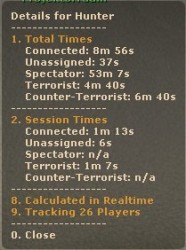
This scriptaddon tracks the played time of each player on your server.
It shows up the total time to the player if he connects.
You can add commands for the most active players.
[b][size=18]Features:[/size][/b]
* Players can lookup their own timestats by saying [b]!active[/b].
* Players can lookup the timestats of other online players by saying [b]!active [part-of-playername][/b].
* Players can lookup the most active players for all teams or for a single team by saying [b]!active top [CT/T/Spec][/b].
* Players can loopup the remaining time for a Tag/Model by saying [b]!active status [part-of-playername][/b].
* Top does support topX syntax. eg. top7, top12, top21, ...
* Shows up the total played time of a player on (dis)connect and team changes.
* Shows up the session played time of a player on team changes.
* [i](Optional) [/i]You can setup usertags that will get added to a players name if he has played long enough.
* [i](Optional) [/i]You can setup usermodels that will get assigned to a player if he has played long enough
[b][size=18]Requirements:[/size][/b]
* Mattie Eventscripts [i]([url=http://forums.mattie.info/cs/forums/viewtopic.php?t=17891]2.0.0.247a[/url] +)[/i]
[b][size=18]Installation:[/size][/b]
* Extract the file into your folder and upload the files
* Configurations are stored in the .txt file inside the most_active folder
* Add the config to your [b]server.cfg[/b]: [syntax="es"]// How much days should inactive users be stored, before their settings get deleted? ( default = 30 )
most_active_savetime 30
// Should the scriptaddon annouce player time stats on connect? ( 1 = on | 0 = off )
most_active_msg_connect 1
// Should the scriptaddon annouce player time stats on disconnect? ( 1 = on | 0 = off )
most_active_msg_disconnect 1
// Should the scriptaddon annouce player time stats on teamchange? ( 1 = on | 0 = off )
most_active_msg_teamchange 1
// Ignore bots? ( 1 = yes | 0 = no )
most_active_ignore_bots 0
// Enable UserTags feature? ( 1 = on | 0 = off )
most_active_usertags 0
// Enable UserModels feature? ( 1 = on | 0 = off )
most_active_usermodels 0[/syntax]
* Add this to your [b]autoexec.cfg[/b] (after Auth): [syntax="es"]es_load most_active[/syntax]
* Restart your server
[b][size=18]License:[/size][/b]
[url=http://creativecommons.org/licenses/by-nc-sa/3.0/us/][img]http://i.creativecommons.org/l/by-nc-sa/3.0/us/88x31.png[/img][/url]
Have Fun :)
Greets
Hunter



 Upload Addon