[size=24][color=darkred]Server Redirect[/color][/size]
[size=18][color=blue]Description[/color][/size]
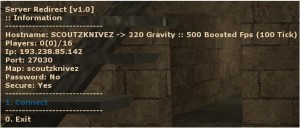
Displays Information & Allows Connection to other Servers via Popup Menus
[size=18][color=blue]Requirements[/color][/size]
Eventscripts v2.0.0.250i: [url=http://mattie.info/cs]Mattie's Download Page[/url]
+w00t
Installation
[size=18][color=blue]Installation[/color][/size]
[color=green]Automatic[/color]
-> es_install serverRedirect -autoload
-> Add the following line to your autoexec.cfg:
:: es_load serverRedirect
-> Alternatively to load manually:
:: rcon es_load serverRedirect
-> Restart your server
[color=green]Manual[/color]
-> Extract Downloadable .zip file to .../<gameDir>/
-> Add the following line to your autoexec.cfg:
:: es_load serverRedirect
-> Alternatively to load manually:
:: rcon es_load serverRedirect
-> Restart your server
[size=18][color=blue]Configuration[/color][/size]
1) Add each <ip>:<port> on a seperate line in .../<gameDir>/addons/eventscripts/serverRedirect/servers.txt
2) Load the script once and a serverRedirect.cfg configuration file will automatically be created:
[code]// ******************************
// Script Configuration
// ******************************
// Frequency server query updates. Must be integer (Default=60)
serverRedirect_updateFrequency 60
// Client console/say command to open menu. Must be string (Default="!servers")
serverRedirect_popupCommand "!servers"[/code]
Edit it to your liking.
Version Notes For 1.0
Updated on: 2009-06-01 06:03:16 EST by Adz (View Zip Contents)
Displays Information & Allows Connection to other Servers via Popup Menus



 Upload Addon