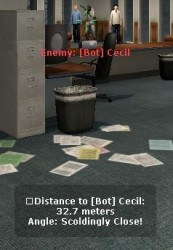
This mod allows either specific designated players, or all players to view information about their closest enemy. It will tell them their distance away from them in meters, and also their angle on whether or not they're looking at them. The angle will tell them a 'hot' or 'cold' game. If they're looking directly at them, the message will be 'hotter'. If they're looking away from them, the message will be 'colder'.
The current config options are as followed...
[code]
// ../cstrike/addons/eventscripts/distance_checker/config.cfg
// >>> To configure the languages, see strings.ini
dc_allow_type "admins"
// This is who is allowed to see players near to them
// 'all' = Everyone on the server
// 'admins' = Certain SteamID's... (see below)
dc_admin_list "STEAM_ID_LAN; STEAM_0:1:10717798"
// If dc_allow_type is set to "admins", then this list
// is a list of all the steamid's you'd like to be able
// to see the closest player.
[/code]
The current language options (note: German, French and Spanish done by translators, so they may not be perfect):
[code]
[very close]
# This text appears when the angle is very close to the player
en="Scoldingly Close!"
es="Cerrar Regaño!"
fr="Gronder Fermer"
de="Schelten Schließen"
[close]
# This text appears when the angle is close to the player
en="Red Hot"
es="Al rojo vivo"
fr="Rouge Chaud"
de="Rot Heiß"
[moderate]
# This text appears when the user is facing a moderate angle away form the player
en="Lukewarm"
es="Tibia"
fr="Tiède"
de="Lau"
[far]
# This text appears when the angle is far from the player
en="Ice Cold"
es="Helada"
fr="Glaciale"
de="Vereisen Sie Kälte"
[distant]
# This text appears when the angle is very distant from the player
en="Pneumonic Freezing"
es="Neumónica Congelación"
fr="Gel Pneumonique"
de="Pneumonic Frierend"
[hudhint]
# This is the text that will appear at the bottom of the players screen
# Tokens:
# $name = Name of the closest player to the user
# $distance = The distance (in meters) to the closest player
# $angle = How close the player is looking to the other player
# \n = New line
en="Distance to $name:\n$distance meters\nAngle: $angle"
es="Distancia a $name:\n$distance m\nAngle: $angle"
fr="Distancier à $name:\n$distance mètres\nInclinent: $angle"
de="Distanzieren Sie zu $name:\n$distance Meter\nWinkel: $angle"
[/code]
Thanks goes to many who helped me with the angle code:
Don
SuperDave
And especially GODJonez, the master of maths ;)
Installation
Download, and extract to cstrike. Open up cfg/autoexec.cfg and add the following line
[code]
es_load distance_checker
[/code]
Save and exit.
Edit the config.cfg to your preference, then save and load the mod.
Version Notes For 1.0.0
Updated on: 2008-03-23 14:22:25 EST by freddukes (View Zip Contents)
Released to the public



 Upload Addon