[b][size=120]Features:[/size][/b]
Every feature is configurable:[code]// ********************************
// * Notifications v 2.0 Settings *
// ********************************
// ***************
// -> WEBSEITE <-
// ***************
// Website advert on/off
notifications_website_enable 1
// Name of your website here
notifications_website "http://my-web-site.com"
// **********************************************
// -> FRIENDLY FIRE - RATES - MAP - LANGUAGE <-
// **********************************************
// "ff" command on/off - if a player types it in, they see if it's turned on or off
notifications_ff 1
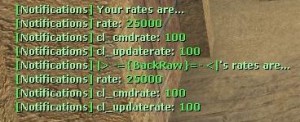
// "!rates" command on/off - the player sees what his rates are set to
notifications_rate_player 1
// "!showrates" command on/off - everyone sees what the rates of the user who typed it in are set to
notifications_player_rates 1
// "map" command on/off - shows which map is currently played
notifications_map 1
// *********************
// -> JOIN - ACTIVE <-
// *********************
// Turns on/off if it should be shown that a player is joining the game
notifications_player_join 1
// Turns on/off if it should be shown that the player is ready for battle
notifications_player_active 1
// ***************
// -> FUNMAPS <-
// ***************
// Turns on/off if every player should be given the "Assaultsuit" if they spawn on a fun map
notifications_funmaps 1
// If the above setting is set to 1, write in your funmaps here (split with ';')
notifications_funmaps_list ";"
// *********************************************************
// -> SELF-HIT - LAST HIT - TEAM ATTACK - KILLER-WEAPON <-
// *********************************************************
// Turns on/off if the player should be warned, because they hurt themselves
notifications_hurt_self 1
// Turns on/off if the player should be warned if they attacked team mate. Shows how many HP the mate has left, too
notifications_team_attack 1
// Turns on/off if the player should be told what weapon he was killed with and how many HP the attacker has left
notifications_death_weapon 1
// ************
// -> BOMB <-
// ************
// Turns on/off if the Terrorists should be told that the bomber dropped the bomb because of their death
notifications_bomb_drop_death 1
// Turns on/off if the Terrorists should be told that the bomb has been thrown away
notifications_bomb_drop 1
// Turns on/off if the Terrorists should be told that the bomb has been picked up
notifications_bomb_pickup 1
// Turns on/off if the Terrorists should be told that the bomber is planting the bomb
notifications_bomb_planting 1
// Turns on/off if the Terrorists should be told that the bomber has planted the bomb successfully
notifications_bomb_has_been_planted 1
// Turns on/off if the Counter-Terrorists should be told that the bomb is being defused
notifications_bomb_defusing 1
// Turns on/off if the Counter-Terrorists should be told that the bomb has been defused successfully
notifications_bomb_has_been_defused 1
// ***************
// -> FLASHED <-
// ***************
// Turns on/off if the player should be told how long they've been flashed (in seconds)
notifications_flash 1[/code]
[list][b][u]Website feature:[/u][/b]
Announces your website on every round start.
[u][b]Joining players feature:[/b][/u]
Announces a new player that's joining the game.
[u][b]FF on or off? Which map?[/b][/u]
By typing "map" it shows the current map, by typing "ff" it announces whether or not Friendly Fire is on.
[u][b]Damage?![/b][/u]
Shows how many damage you gave the victim if he is dead.
[u][b]Attackerweapon, you, and your team mates...[/b][/u]
Shows whether or not you've hit yourself (e.g. with a HE-Grenade)
Shows how many HP your team mate has left after your hits
Show which weapon the attacker killed you with
[u][b]Bomb/Defuse features:[/b][/u]
Notices your team mates that you dropped the bomb for 2 reasons: you threw it away or because of your death
Notices your team mates that you picked up the bomb
Notices your team mates that you're planting the bomb
Notices your team mates that you planted the bomb
Notices your team mates that you're defusing the bomb
Notices your team mates that you defused the bomb
[u][b]Commands:[/b][/u]
ff - shows whether or not Friendly Fire is on
map - displays the map you are playing on
!rates - displays your rates only to you
!showrates - shows everybody your rates[/list]
Item configuration ([b]notifications_items.ini[/b]):[code]# These items where mapped to their real names using information mostly out of Wikipedia
# http://en.wikipedia.org/wiki/Glock_pistol
glock = "Glock 18"
# http://en.wikipedia.org/wiki/Heckler_&_Koch_USP
usp = "H&K USP: Universal Self-loading Pistol"
# http://en.wikipedia.org/wiki/SIG_Sauer_P226#P228_.28M11.29
p228 = "SIG Sauer P228 Compact"
# http://en.wikipedia.org/wiki/IMI_Desert_Eagle
deagle = "IMI Desert Eagle"
# http://en.wikipedia.org/wiki/FN_five_seven
fiveseven = "Five-seveN"
# http://en.wikipedia.org/wiki/Beretta_92#Operation
elite = "Dual 96G Elite Berettas"
# http://en.wikipedia.org/wiki/MAC-10
mac10 = "MAC-10"
# http://en.wikipedia.org/wiki/Steyr_TMP
tmp = "Steyr TMP: Tactical machine pistol"
# http://en.wikipedia.org/wiki/Mp5_Navy
mp5navy = "H&K MP5 Navy"
# http://en.wikipedia.org/wiki/Heckler_&_Koch_UMP
ump45 = "H&K UMP: Universal machine pistol"
# http://en.wikipedia.org/wiki/FN_P90
p90 = "FN P90"
# http://en.wikipedia.org/wiki/Benelli_M3
m3 = "Benelli M3 (Super 90)"
# http://en.wikipedia.org/wiki/Benelli_M4
xm1014 = "Benelli M4 Super 90"
# http://en.wikipedia.org/wiki/IMI_Galil
galil = "IMI Galil"
# http://en.wikipedia.org/wiki/FAMAS
famas = "FAMAS"
# http://en.wikipedia.org/wiki/AK-47
ak47 = "AK47: Avtomat Kalashnikova, Model 47"
# http://en.wikipedia.org/wiki/M4_carbine#M4A1
m4a1 = "M4A1 Carbine"
# http://en.wikipedia.org/wiki/SIG_SG_550#SG_552_Commando
sg552 = "SIG SG 552 Commando"
# http://en.wikipedia.org/wiki/Steyr_AUG
aug = "Steyr AUG: Universal army rifle"
# http://en.wikipedia.org/wiki/M249_light_machine_gun#Variants
m249 = "M249-SAW Para"
# http://en.wikipedia.org/wiki/Steyr_Scout
scout = "Steyr Scout"
# http://en.wikipedia.org/wiki/Heckler_&_Koch_G3#Users -> Malaysia
g3sg1 = "H&K G3/SG1"
# http://en.wikipedia.org/wiki/SIG_SG_550
sg550 = "SIG SG 550"
# http://en.wikipedia.org/wiki/Accuracy_International_Arctic_Warfare#AWP_.28Arctic_Warfare_Police.29
awp = "AWP: Arctic Warfare Police"
# http://en.wikipedia.org/wiki/Stun_grenade
flashbang = "Flashbang grenades"
# http://en.wikipedia.org/wiki/Smoke_grenade
smokegrenade = "Smoke grenade"
# http://en.wikipedia.org/wiki/Hand_grenade
hegrenade = "Hand grenade"
# http://en.wikipedia.org/wiki/Combat_knife
knife = "Combat Knife"
# http://en.wikipedia.org/wiki/Kevlar#Armor
kevlar = "Kevlar"
# http://en.wikipedia.org/wiki/Kevlar#Armor
assaultsuit = "Kevlar and helmet"
# http://en.wikipedia.org/wiki/Night_vision_device
nightvision = "NVD: Night vision device"
# http://en.wikipedia.org/wiki/C-4_(explosive)
c4 = "C-4"
# http://counterstrike.wikia.com/wiki/Defusal_kit
defuser = "Defusal kit"[/code]
Look at the forums, please.
Installation
Extract the Zip file to the ./cstrike (folder structure is already done by me)
[b][size=90]Note for changing to configuration[/b][/size]:
You need to [b]es_load notifications[/b] once, then the configuration file appears in the folder [b]cstrike/addons/eventscripts/notifications[/b]
There, edit everything you want. After that, reload the addon: [b]es_reload notifications[/b].
Done.
[b][size=90]Load the script[/size][/b]:
Write this into your autoexec.cfg:
[code]es_load notifications[/code]
Version Notes For 2.0
Updated on: 2012-05-01 15:16:33 EST by BackRaw (View Zip Contents)
fixed [b]notifications_items.ini[/b] looks awful.



 Upload Addon